Introduction
Ever wonder why shapes look perfect every time? Die cuts make repeat shapes fast and clean. A die cutting machine helps you keep edges crisp and sizes consistent. In this guide, you’ll see the most common uses and learn how to choose the right setup.
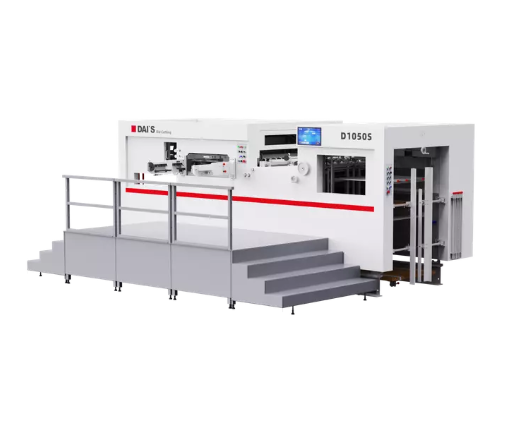
Where die cuts are used most
Die cuts show up in daily products. They also support many production and creative tasks. Below are the most common places you will use them.
Packaging and unboxing for boxes, inserts, and hang tags
Packaging needs shape control. It also needs speed. A die cut box can fold, lock, and protect. Inserts hold items in place. Hang tags add branding and pricing. Window cutouts help shoppers see inside.
Die cuts can reduce packing time. They can also reduce damage risk. They can also improve shelf impact. Many brands use custom shapes to stand out.
Common packaging die cuts include:
Mailer boxes and retail cartons
Inserts and dividers
Tear strips and easy-open tabs
Hang tags and header cards
Protective pads from foam or board
Labels and branding for product labels, decals, and seals
Labels need clean edges. They also need repeatable shapes. Die cuts help labels peel well. They also help sealing stickers align fast. This matters on busy packing lines.
You can use a die cutting machine for labels in two ways. You can cut sheets. Or you can cut rolls in production. The right choice depends on volume.
Common label and branding uses:
Product labels and barcode labels
Tamper seals and closing stickers
Decals for devices and tools
Brand marks and promotional stickers
Print, stationery, and craft for cards, invitations, and scrapbooking
Print products need precision. They also need a premium feel. Die cuts add frames, shapes, and layered effects. They can also add pop-ups and reveal windows.
This is where a manual die cutting machine for cardstock can shine. It is simple. It is also consistent for standard shapes. A digital option helps when designs change often.
Common print and craft uses:
Invitations and greeting cards
Folded cards and layered panels
Scrapbooking titles and accents
Journaling tabs and dividers
Industrial and OEM parts for gaskets, spacers, and cushioning
This is where die cuts become “parts,” not “decor.” Many products need soft components. They need gaskets. They need spacers. They need insulation pads. They need protective films.
These parts must fit. They must also repeat. A die cutting machine for gaskets supports that. At higher volumes, rotary systems can run fast. At tighter tolerances, process control matters more.
Common industrial uses:
| Use case |
Typical die-cut items |
Common materials |
Why die cuts help |
Best-fit die cutting machine |
| Packaging & unboxing |
Cartons, inserts, hang tags, tear strips |
Paperboard, corrugated, foam |
Faster assembly, consistent folds, clean windows |
Flatbed die cutting machine; outsource for high volume |
| Labels & branding |
Product labels, seals, decals |
Paper labels, vinyl, films |
Clean edges, easy peel, consistent shapes |
Digital die cutting machine for short runs; rotary die cutting machine for rolls |
| Print & craft |
Cards, invitations, layered shapes |
Cardstock, specialty paper |
Premium look, repeat shapes, crisp details |
Manual die cutting machine for standard dies; digital for frequent changes |
| Industrial parts |
Gaskets, pads, spacers, insulation |
Foam, rubber, thin plastics |
Stable fit, repeatable parts, less rework |
Rotary/flatbed die cutting machine depending on volume and thickness |
Why people use a die cutting machine for these jobs
People do not choose die cutting for fun. They choose it because it solves problems. It reduces manual work. It also stabilizes quality.
Repeatability and consistency for identical shapes
Hand cutting varies. People get tired. Blades drift. Measurements change. A die cutting machine keeps shapes consistent. It helps you hit the same spec each time.
This matters for packaging fit. It matters for assembly. It matters for labels that must align. It matters for gaskets that must seal.
Speed and throughput for faster production
A good die cut can take seconds. That speed adds up fast. Even manual crank systems can be quick for short runs. Digital systems can speed up design changes.
If you run batches, speed lowers labor per unit. It can also reduce line bottlenecks.
Cleaner edges and better fit with stable results
Die cutting can look “finished.” Edges look crisp. Corners look clean. Fit becomes predictable. This is a key reason brands use it.
Clean edges depend on setup. They also depend on tooling. Dull edges can tear. Wrong pressure can crush. The process still needs control.
Cost efficiency at volume by reducing labor and waste
Unit cost often drops as volume grows. Tooling cost spreads out. Labor per unit falls. Waste can fall too. Nesting layouts help reduce scrap.
A rough rule many shops use is simple. High volume favors tooling. Low volume favors flexibility. Exact break-even depends on your design mix, material, and labor.
Manual vs digital die cutting machine: which fits your use case
Many buyers get stuck here. They ask, “Which machine is best?” The better question is: “Which workflow fits our work?”
Manual die cutting machine for standard shapes and hands-on control
Manual machines use a die and pressure. You build a “sandwich” stack. You roll it through. It is simple. It is also easy to learn.
Manual systems work well when:
Shapes stay stable
You reuse the same dies often
Material is thin to medium
Your runs are small to medium
You want low operating complexity
Limitations exist. Manual systems need physical dies. Each new design needs a new die. Very thick materials may not fit. Very fine details can fail.
Digital die cutting machine for flexible designs and quick changes
Digital machines cut using a blade path. They rely on software files. You import a design. The machine cuts it. No physical die is required for each shape.
Digital systems work well when:
They also have limits. Blades wear. Some materials stretch. Some cuts need multiple passes. Very high volume can favor rotary systems instead.
Decision shortcuts by design variety, run size, setup time, and budget
Use these simple questions:
Do we change designs weekly?
Do we cut hundreds per day?
Do we need tight fit tolerance?
Do we cut thick foam or rubber?
Do we need roll-to-roll workflow?
If designs change a lot, digital helps. If designs stay stable and volumes grow, tooling helps. If parts are industrial, material often drives the decision.
| Option |
Best for |
Strengths |
Trade-offs |
Typical pattern |
| Manual die cutting machine |
Standard shapes, repeat designs |
Simple workflow, consistent cuts, low learning curve |
Needs physical dies, less flexible for new designs |
Small to medium runs, stable catalog |
| Digital die cutting machine |
Frequent design changes, prototypes |
No physical dies, fast iteration, flexible shapes |
Blade wear, slower per unit at scale, material limits |
Many SKUs, short runs, rapid updates |
| Outsourcing die cutting |
High volume or tight specs |
Production capacity, stable QC, roll-to-roll options |
Lead time, MOQs, less day-to-day control |
Large batches, repeat orders |
Common mistakes to avoid when choosing and setting up
These mistakes cost money:
Buying too small for your sheet size
Ignoring material thickness limits
Underestimating tooling lead times
Skipping sample runs and fit checks
Using wrong pressure and pad stack
Also watch file quality. Bad vectors lead to bad cuts. Also watch die storage. Bent dies cut poorly.
Materials you can die cut, and how thickness changes the approach
Material choice changes everything. It changes pressure needs. It changes edge quality. It changes speed. It also changes tool wear.
Paper and cardstock for creases, pop-ups, and layered designs
Paper and cardstock are common. They cut clean when setup is right. Cardstock can crack if scored wrong. Crease lines help folds stay neat.
Best practices:
Use scoring for folds
Avoid overly thin bridges
Test grain direction on paper
Check edge fuzz on textured stock
Vinyl and films for decals, stencils, and signage graphics
Vinyl cuts well, but it can stretch. Adhesive layers can lift. Films can tear if blades are dull. Weedability matters for decals.
Tips for better vinyl results:
Use sharp blades
Use proper cutting mat grip
Add weeding boxes in designs
Keep small text sizes realistic
A die cutting machine for stickers should support clean kiss-cuts. It should also control depth well.
Textiles and soft goods for fabric, felt, leather, and patches
Soft materials behave differently. They can fray. They can stretch. They can compress. You may need stabilizers. You may need stronger tooling.
Common textile uses:
Appliqués and patches
Leather tags and shapes
Felt accents and liners
Foam, rubber, and thin plastics for pads, seals, and protection
Foam compresses under pressure. Rubber can resist cutting. Thin plastics can crack. These materials often need better process control.
For functional parts, test fit matters. Seal performance matters. Compression set matters too. Those properties are material-specific, so choose materials based on your end use.
| Material |
What to watch |
Best cut type |
Common issues |
Quick setup tip |
| Paper / cardstock |
Grain direction, cracking on folds |
Die cut + score |
Edge fuzz, fold cracks |
Add scoring lines; test grain |
| Vinyl / films |
Stretching, adhesive lift |
Kiss-cut or die cut |
Difficult weeding, tearing |
Use sharp blade; add weeding box |
| Fabric / felt / leather |
Fraying, compression, drift |
Die cut (often with backing) |
Fray edges, distortion |
Use stabilizer or backing where needed |
| Foam / rubber / thin plastics |
Compression, resistance, cracking |
Die cut (multi-pass if needed) |
Incomplete cuts, crushed edges |
Tune pressure; validate thickness limits |
Design your die cuts for easier production and easier use
Design is not only about looks. It controls cost. It also controls yield. A small tweak can cut scrap. It can also reduce failures.
Make it functional with tabs, peel points, and alignment marks
Functional features speed real work. Tabs help removal. Peel points help labels start clean. Alignment marks help placement.
Examples:
Make it durable by avoiding fragile bridges and sharp weak corners
Fragile bridges tear. Sharp inside corners crack. Tiny details collect debris. These issues raise defect rates.
Design rules that help:
Make it efficient through nesting layouts and waste reduction
Nesting reduces waste. It also reduces cost. It also speeds cutting. If you outsource, nesting can change your quote.
Good nesting goals:
More parts per sheet
Fewer tool strikes
Consistent orientation
Minimal scrap zones
Make it user-friendly for weeding, peeling, and assembly flow
For labels, weeding time matters. For packaging, fold flow matters. For parts, pick-and-place matters. Design for the operator’s hands.
Ask these questions:
Can they peel it fast?
Can they separate parts cleanly?
Can they fold it without guessing?
Can they avoid misalignment easily?
Buy a die cutting machine or outsource die cutting services
This is a practical decision. Owning gives control. Outsourcing gives scale. Both can work well.
When owning a die cutting machine makes sense for iteration and control
Owning helps when you iterate fast. It also helps when you need quick turnaround. It reduces waiting time for samples. It can also protect sensitive designs.
Ownership often makes sense when:
You prototype weekly
You run small batches often
You need in-house control
You want faster design cycles
When outsourcing is better for scale, tolerances, and specialty materials
Outsourcing helps when volumes grow. It also helps when tolerances tighten. It helps when materials are hard to cut. It helps when you need roll-to-roll output.
Outsourcing often makes sense when:
Volumes are large
Tooling and QC need expertise
Roll-to-roll output is needed
You need consistent specs
How to compare true costs including tooling, setup, and unit economics
Do not compare only unit price. Compare total cost. Include:
Tooling cost and life
Setup fees and changeover time
Scrap rate and rework time
Labor time per unit
Lead time and inventory cost
Below is a quick comparison table.
| Decision factor |
Own a die cutting machine |
Outsource die cutting |
| Design changes |
Fast and flexible |
Slower, needs re-quote |
| Upfront cost |
Higher for equipment |
Higher for tooling in some cases |
| Unit cost at scale |
Can be higher |
Often lower at high volume |
| Quality control |
You control it |
Supplier controls it |
| Lead time |
Very short for repeats |
Depends on queue and shipping |
What to ask a supplier about QA, samples, and material sourcing
Ask direct questions:
What tolerances can they hold?
How do they check dimensions?
Can they provide first-article samples?
How do they control adhesive liner cuts?
What files do they require?
How do they package parts for shipping?
Quality checklist: how to get clean, reliable die cuts
Quality is not luck. It is setup plus control. Use this checklist to reduce defects.
Tooling condition and die type selection
Tooling drives edge quality. Dull dies tear. Bent dies miscut. Wrong die type raises waste.
Basic checks:
Is the cutting edge sharp?
Is the die flat and true?
Is the die type right for material?
Is it stored to avoid bends?
Machine setup basics like pressure, alignment, and feeding
Pressure must match material. Too low causes incomplete cuts. Too high causes crush and wear. Alignment prevents drift. Feeding stability prevents skew.
Setup checks:
Defect troubleshooting for tearing, incomplete cuts, and edge issues
Common issues and fixes:
Tearing: reduce pressure, sharpen tooling
Incomplete cuts: raise pressure, add pass
Edge fuzz: check blade sharpness, change stock
Stretching: reduce pull, use stabilizer
Misalignment: adjust guides, check feed
Simple acceptance tests for fit and dimensional consistency
Do not skip basic tests. They save money.
Measure key dimensions on samples
Test fit parts in assembly
Peel test for labels and films
Check fold lines on packaging
Spot-check batch variation
A short “go/no-go” table helps teams.
| Test |
What it tells you |
Pass standard |
| Dimensional spot check |
Size repeatability |
Within agreed tolerance |
| Fit test |
Assembly success |
Seats clean, no force |
| Peel test |
Label usability |
Peels clean, no tear |
| Visual edge check |
Finish quality |
No fuzz, no tearing |
Conclusion
Die cuts create repeatable shapes for packaging, labels, print crafts, and industrial parts. Pick the job first, then confirm material and thickness. Estimate volume and design change rate, then choose manual, digital, or outsourced cutting.
Daishi Printing Machinery Co., Ltd. provides die cutting machine solutions and practical support. They help you get clean edges, consistent fit, and faster output with less waste.
FAQ
Q: What do you use die cuts for in packaging?
A: Boxes, inserts, tags; a die cutting machine makes repeat shapes fast.
Q: How does a die cutting machine help with labels?
A: It delivers clean edges and easy peel for stickers and seals.
Q: Manual or digital die cutting machine—how do I choose?
A: Manual fits stable shapes; digital fits frequent changes and quick tests.
Q: What materials can a die cutting machine cut?
A: Paper, vinyl, fabric, foam, rubber, and thin plastics, if set correctly.
Q: Why do die cuts reduce waste and rework?
A: Consistent parts fit better; a die cutting machine improves repeatability.
Q: What causes incomplete cuts, and how do I fix it?
A: Low pressure or dull tools; tune settings on the die cutting machine.


