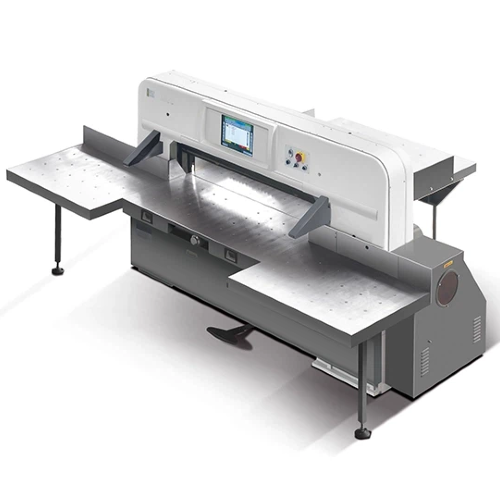
A professional Paper cuting machine is designed to turn paper stacks into consistent, clean, and repeatable sheet sizes—whether you’re preparing materials for printing, packaging, laminating, or finishing. Yet in real production, paper cutting is often where quality drift begins: a few millimeters of size error, a slight skew, or rough edges can quickly affect the next step in the workflow.
Why Paper Cutting Problems Happen in Production
Even when the blade is sharp and the operator is skilled, paper cutting is affected by a mix of material behavior, stacking conditions, and setup discipline. Understanding these variables is the fastest way to prevent recurring issues.
Material-related factors (paper type, thickness, grain direction, humidity)
Paper is not a perfectly rigid material. Different paper grades and coatings behave differently under clamp pressure and blade contact. Thickness and stiffness affect how the stack compresses; grain direction can influence how fibers separate; and humidity can change friction between sheets. A professional Paper cuting machine helps because it gives you more stable and controllable cutting conditions so material variability shows up less in the final result.
Stack-related factors (stack height, squareness, slippage)
Many cutting defects don’t start at the blade—they start at the stack. If a stack is not squared correctly, the cut can be “accurate” relative to the stack but still wrong relative to your intended geometry. Stack height also affects compression: a taller stack may compress unevenly from top to bottom, which can lead to layer movement during the cutting stroke. A Paper cuting machine with stable clamping and consistent cutting action supports better stack control.
Process & operator factors (measurement workflow, setup consistency)
Repeatability depends heavily on whether the same measuring approach is used every time. If the workflow changes between operators—different alignment habits, different clamping habits, different “how tight is tight” rules—your results will drift. Professional equipment supports standardized operation by making the cutting sequence more consistent and easier to repeat.
Equipment-related factors (blade condition, clamp stability, backgauge precision)
In most professional cutting workflows, three things matter most:
Blade condition (sharpness + correct setup)
Clamp stability (preventing sheet movement)
Positioning repeatability (often via a backgauge)
A professional Paper cuting machine is designed around those three pillars, so troubleshooting becomes systematic rather than guesswork.
A Quick Troubleshooting Map (Table)
Use the table below as a practical checklist. It connects common problems to what you should inspect first, and what a professional Paper cuting machine contributes to stabilize the result.
Cutting Problem | What You’ll Notice | First Checks | How a Professional Paper cuting machine Helps |
Inaccurate cut size | Sheets don’t match target dimensions; size drifts between batches | Measurement method, positioning repeatability, stack movement | Repeatable positioning workflow + controlled clamping for consistent size output |
Misalignment / skew | Edges look angled; sheets are not square | Stack squaring, side alignment, clamp balance | Better stack control and guided positioning for squareness stability |
Rough edges / burrs | Fibers tear, edges look “furry,” more paper dust | Blade condition, cutting frequency, paper type | Stable cutting action + maintenance routine to keep edge quality consistent |
Stack slipping | Layers shift; top sheets move; offsets appear after cutting | Clamp setting, stack height, loading technique | Clamping control reduces sheet movement during cutting |
Low efficiency / re-cuts | Too much re-measuring; frequent trimming; bottlenecks | Job batching, setup consistency, repeat-job handling | Faster repeat operations once settings are established; less rework |
Safety & process control | Hard to standardize safe operation | Operator workflow, training consistency | More controlled sequence supports predictable, standardized cutting |
Problem 1: Inaccurate Cut Size (Dimensions Not Matching the Target)
When the cut size is inconsistent, it usually shows up as “close but not correct.” That’s one of the most frustrating issues because it wastes time in re-measuring and trimming.
Typical symptoms
The first stack is correct, but later stacks drift slightly.
Cut results vary between operators or between shifts.
Final sheet size is “almost right” but not reliably repeatable.
Root causes to check
Positioning repeatability
If your positioning method is different every time (especially with manual measuring), the result will naturally drift.
Stack movement under pressure
If the stack shifts during clamping or cutting, the back edge position changes and your final size changes.
Inconsistent measuring workflow
Even small workflow differences—like how you push paper against the guide—can change the final dimension.
How a professional Paper cuting machine helps
A professional Paper cuting machine supports accuracy by making the cutting setup repeatable:
Stable positioning for repeated cuts: When the same target size is required across multiple stacks, repeatable positioning reduces variation.
Controlled clamping: Clamping stabilizes the stack, minimizing movement that changes the final cut dimension.
More consistent operating sequence: A consistent workflow reduces “human variability,” which is a major source of size drift.
The result is not just accuracy on one stack—but repeatable accuracy across repeated jobs.
Problem 2: Misalignment / Skewed Cutting (Non-square Sheets)
Misalignment creates problems that show up later: skew can ruin print registration, folding symmetry, and packaging assembly. Even a small skew can become a big issue when multiple steps rely on square geometry.
Typical symptoms
A cut edge appears slightly angled rather than perfectly perpendicular.
Sheets look fine in a small pile but “fan out” when stacked.
Downstream operations (folding, laminating, die cutting) show misregistration or poor fit.
Root causes to check
Stack squaring discipline
If sheets are not squared before cutting, your cut is aligned to a skewed stack.
Alignment method (side guide usage)
A consistent method of pushing paper into the same reference line is essential.
Clamp pressure balance
If clamp conditions allow one side to move more than the other, skew becomes more likely.
How a professional Paper cuting machine helps
A professional Paper cuting machine improves squareness by supporting consistent stack control:
Guided positioning + stable clamp behavior helps keep the stack square during the cut.
Repeatable setup routines make “square cutting” a process standard, not a one-time success.
When squareness is stable, downstream operations become easier—and overall production quality becomes more predictable.
Problem 3: Rough Edges, Burrs, or “Furry” Cut Edges
Edge quality matters more than many teams expect. Rough edges can create visible defects in premium packaging and can also increase dust, which affects cleanliness and maintenance.
Typical symptoms
Edges show tearing or fuzz.
Paper dust increases around the cutting area.
The cut edge looks uneven when viewed closely.
Root causes to check
Blade condition and maintenance cadence
A dull blade is one of the most common sources of poor edge quality.
Cutting frequency and workload
High throughput requires disciplined blade and setup management to keep the edge consistently clean.
Paper characteristics
Some paper fibers are more likely to tear, especially if humidity changes friction and compression behavior.
How a professional Paper cuting machine helps
A professional Paper cuting machine supports cleaner edges through stability and maintenance discipline:
More stable cutting action helps produce smoother edges across different paper types.
Maintenance-friendly workflow encourages regular inspection and consistent blade management.
Controlled clamping and cutting sequence reduces fiber tearing caused by stack movement.
The goal is simple: clean edges that stay clean—not only immediately after blade service, but throughout normal production cycles.
Problem 4: Paper Slipping During Cutting (Stack Shifts)
Stack slipping creates unpredictable results: you might see offsets between layers, or you might only notice the issue when sheets fail in a later process step.
Typical symptoms
The top portion of the stack shifts slightly during cutting.
Layers are offset after the cut, even if the top sheets look fine.
Repeated jobs show inconsistent results even with the same target size.
Root causes to check
Clamp setting and stack height
Too much height without stable control can increase compression differences across layers.
Loading technique
If the stack is not placed consistently, one side may be under more pressure and shift during cutting.
Surface friction conditions
Coated paper, humidity changes, and dust can all change friction and affect stability.
How a professional Paper cuting machine helps
A professional Paper cuting machine reduces slipping by stabilizing the stack before the cutting action:
Clamping control improves stack hold-down behavior.
Repeatable loading habits are easier to implement when the machine supports consistent setup steps.
Reliable multi-sheet cutting becomes practical when the stack is held firmly and consistently.
This is especially important when your goal is uniform output across multiple stacks for one job.
Problem 5: Low Efficiency (Slow Throughput, Too Many Re-cuts)
Efficiency is not only about cutting faster—it’s about cutting right the first time so you avoid rework. Many teams lose time not during the cut, but during repeated measuring and correction.
Typical symptoms
Operators measure repeatedly to “be safe.”
Many stacks require small re-trims.
Cutting becomes a bottleneck before finishing or packaging.
Root causes to check
Weak repeat-job workflow
If you can’t reliably repeat a cut size, every batch becomes a “new setup.”
Too many manual checks
Manual measuring is slow when repeated across multiple stacks.
Inconsistent stack preparation
If squaring/loading varies, operators compensate with extra steps.
How a professional Paper cuting machine helps
A professional Paper cuting machine improves throughput by stabilizing repeatability:
Once settings are established, repeat operations become faster because the process becomes predictable.
Less rework and fewer re-cuts because cuts are more consistent across stacks.
Standardized operation helps teams maintain speed without sacrificing output consistency.
Over time, this approach turns “cutting” from a constant correction loop into a stable production step.
Problem 6: Safety & Process Control Concerns (Cutting Is Hard to Standardize)
In professional workshops and factories, safety is tightly linked to process standardization. When the cutting workflow is inconsistent, it’s harder to train operators and enforce safe habits.
Why standardization matters
Standardization reduces mistakes and improves repeatability.
It supports consistent training and clearer responsibility.
It makes quality checks easier because the process is stable.
How a professional Paper cuting machine supports safer, more controlled operation
A professional Paper cuting machine helps teams build a predictable cutting routine:
Clear operational steps encourage consistent behavior.
Controlled cutting/clamping sequence makes the process more uniform.
Easier standard operating procedures (SOPs) because the machine supports repeatable workflows.
A controlled process protects both the production outcome and the people operating the equipment.
Choosing the Right Paper cuting machine for Your Application
Selecting a Paper cuting machine is easiest when you define your production requirements clearly. Instead of focusing on “general performance,” focus on what your workflow demands every day.
Key selection factors
Cutting width / format size
Match the machine format to your maximum sheet size and typical job range.
Typical stack height and material range
Consider your day-to-day paper thickness, coating types, and stack sizes.
Accuracy expectations & repeat-job frequency
The more repeat jobs you run, the more valuable stable repeatability becomes.
Power & workspace requirements
Plan for installation space and your site’s power standard.
DAI`S electric options listed under Paper cuting machine
DAI`S product category page lists electric models including:
Electric QZK1370M10 Paper Cutting Machine for Crafts
Electric QZK1150/1300M10 Paper Cutting Machine for Crafts
These listings make it easier for buyers to begin model discussions based on format needs and application goals.
What information to prepare before inquiry
To get a fast and accurate recommendation, prepare:
Max sheet size and common finished sizes
Paper types (coated/uncoated), thickness range, and typical stack height
Target tolerance (how precise sizes must be)
Daily output volume and shift pattern
Power standard and installation constraints
When this information is clear, the supplier can align the recommended Paper cuting machine to your real production conditions.
Essential Maintenance Checklist for Consistent Cutting Results
Maintenance is not “extra work”—it’s how you keep your Paper cuting machine delivering the same quality level job after job. A simple checklist prevents most recurring defects.
Daily checks
Clean the cutting area: Remove dust and paper debris that can change friction conditions.
Inspect the work surface: Keep the table area clean for stable loading and squaring.
Confirm basic alignment routine: Use a consistent setup step to ensure the stack is positioned correctly before cutting.
Weekly checks
Blade condition review: Watch for signs of edge quality drift and plan servicing proactively.
Clamp function check: Confirm that clamping behavior remains stable and consistent.
Positioning repeatability check: Run a short repeat-cut routine to confirm sizes remain consistent across a test sequence.
Blade management basics
Safe handling and storage: Proper handling protects the cutting edge and supports safe maintenance.
Sharpening intervals: Use a planned schedule based on workload rather than waiting for quality to fail.
Simple records: Track blade service dates and observed edge quality so the team can spot patterns early.
A disciplined maintenance routine supports the most important outcome: predictable cutting quality.
Conclusion
Paper cutting problems—size drift, skew, rough edges, stack slipping, efficiency loss, and inconsistent process control—are rarely “mystery issues.” In most cases, they come from manageable variables such as material behavior, stack preparation, setup consistency, and equipment stability. With a disciplined workflow and the right professional equipment, these challenges can be controlled and your cutting results can stay clean, accurate, and repeatable.
That’s exactly what a professional Paper cuting machine is built for: repeatable positioning, reliable clamping, and consistent cutting action that supports stable output for the next production step. If you’re planning to upgrade or standardize your cutting process, we offer electric solutions in our Paper cuting machine range, including Electric QZK1370M10 and Electric QZK1150/1300M10 for crafts-oriented applications. To learn more specifications and options, or to get a recommendation based on your sheet size and production needs, we welcome you to contact DAI`S Printing Machinery Co., Ltd. for details and support.
FAQ
1) What is the best Paper cuting machine size for my workshop or factory?
Start with your maximum sheet size and your most common job sizes. Choose a Paper cuting machine format that comfortably covers your largest sheet while still fitting your workspace and power conditions. Preparing clear sheet-size requirements also speeds up supplier recommendations.
2) How do I improve cutting accuracy and repeatability on a Paper cuting machine?
Focus on three controls: repeatable positioning, stable clamping, and consistent stack preparation. Keep the measuring method standardized, square the stack the same way every time, and maintain the blade so edge quality doesn’t force re-trims.
3) Why do I get rough edges after cutting, and how can a Paper cuting machine help?
Rough edges are often linked to blade condition, cutting workload, and material behavior. A professional Paper cuting machine supports cleaner results through stable cutting action and a process that’s easier to maintain consistently with planned blade management.
4) How do I prevent paper stack slipping during cutting?
Use consistent stack loading and avoid pushing stack height beyond what your workflow can stabilize. A professional Paper cuting machine helps by improving stack hold-down behavior through controlled clamping, reducing layer movement during the cutting action.
5) What maintenance tasks keep a Paper cuting machine cutting cleanly and consistently?
Daily cleaning, routine alignment habits, regular clamp checks, and planned blade servicing are the foundation. Add a simple weekly repeatability test cut to catch drift early—before it becomes rework.
6) What information should I provide when requesting a quote for a Paper cuting machine?
Provide max sheet size, typical paper types/thickness, stack height, target tolerance, daily volume, power standard, and workspace constraints. This allows the supplier to recommend the most suitable configuration quickly.
7) Which DAI`S electric Paper cuting machine models are listed for crafts applications?
DAI`S lists Electric QZK1370M10 Paper Cutting Machine for Crafts and Electric QZK1150/1300M10 Paper Cutting Machine for Crafts in its Paper cuting machine product category.


